
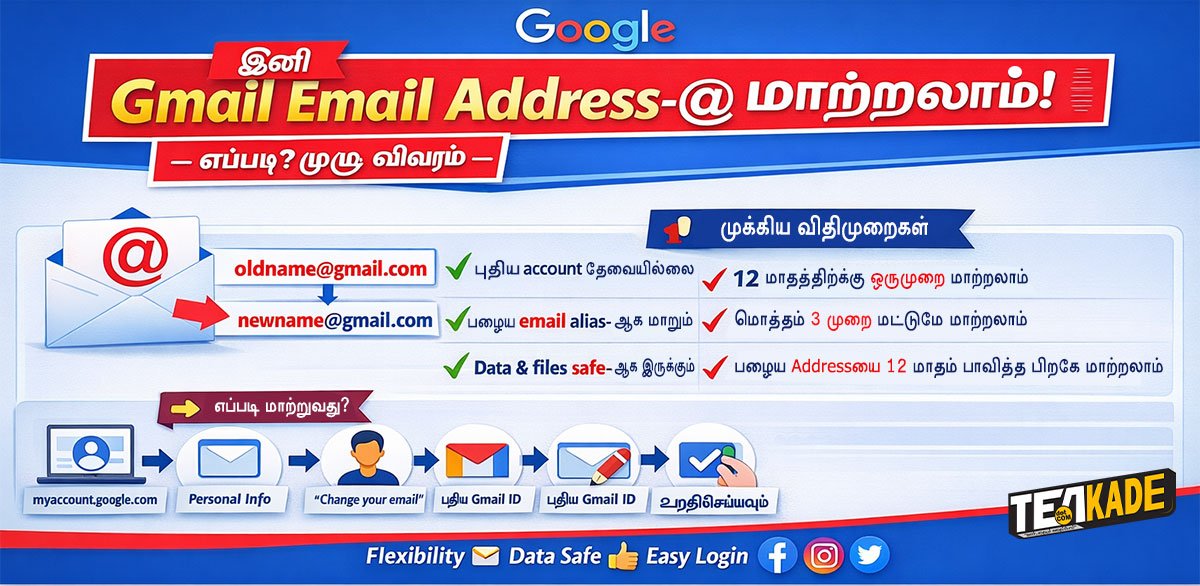
இவ் வசதி மூலம், புதிய account உருவாக்காமல், ஏற்கனவே உள்ள Google account டிலேயே Gmail address ஐ மாற்ற முடியும்.இதுவரை, ஒருமுறை உருவாக்கிய Gmail address ஐ பின்னர் மாற்ற முடியாத நிலையே இருந்தது.
Google வெளியிட்ட தகவலின்படி Email Address ஐ மாற்றினால்,
- பழைய Gmail address delete செய்யப்படாது.
- உங்கள் பழைய Email Address உங்கள் Secondary email ஆக இப்புது பெயர்கொண்ட Email Address உடன் இணைக்கப்பட்டிருக்கும்.
- பழைய email க்கு வரும் mailகள் அனைத்தும் புது inbox இல் கிடைக்கும்.
- பழைய Emails, Google Drive, Photos, Contacts உள்ளிட்ட எல்லா data வும் பாதுகாப்பாக புது பெயருக்கு கீழ் கிடைக்கும்.
- பழைய, புதியத இரண்டு email address களையும் loginக்கு பயன்படுத்தலாம்.
இந்த வசதிக்கு சில விதிமுறைகளும் உள்ளன:
- 12 மாதங்களுக்கு ஒருமுறை மட்டுமே இப்படியாக Gmail address ஐ மாற்ற முடியும்.
- ஒரு Google account ஐ அதிகபட்சம் 3 முறை மட்டுமே மாற்ற முடியும்.
தவறான பயன்பாட்டைத் தடுப்பதற்காக இக்கட்டுப்பாடுகள் விதிக்கப்பட்டுள்ளன.
Gmail Email Address எப்படி மாற்றுவது?
இந்த option இன்னுமே எல்லோருக்கும் கிடைக்க பெற்றிருக்காது அப்படி உங்கள் account ல் கிடைத்திருந்தால்,
கீழ்கண்ட வழிமுறைகளைப் பின்பற்றி மாற்றிக்கொள்ளலாம் :
- google.com→ Personal Info → Email → “Change your email”
- புதிய Gmail username ஐ தேர்வு செய்து, verification steps ஐ complete செய்ததும், email address மாற்றம் நடைமுறைக்கு வரும்.
இந்த புதிய வசதி தற்போது மெல்ல மெல்ல (gradual rollout) எல்லோருக்கும் வழங்கப்பட்டு வருகிறது.
பயனர்களுக்கு ஏன் இது முக்கியம்?
- சிறுவயதில் Open செய்த சிறுபிள்ளை தனமான Gmail ID யை மாற்றி அமைத்துக்கொள்ள முடிகின்றமை.
- இருக்கும் Email ஐ Professional பயன்பாட்டுக்கு ஏற்ற email address ஆக மாற்றிக்கொள்ள முடிக்கின்றமை.
- புதிய account உருவாக்கி dataக்களை மாற்ற வேண்டிய அவசியம் இல்லை
- உங்கள் பழைய Email க்கு வரும் Mailகள் இதற்கு வருவதால் உங்களின் தொடரப்புகள் எவ்வகையிலும் தூண்டிக்கப்படுவதும் இல்லை.
மேலும் இதை பற்றி தெரிந்துகொள்ள (இங்கே Click செய்யவும்)




Pingback: Voice Deep Fake Scam Explained | Tamil
Alright, so I gave ilotto a shot, feeling lucky and all. It’s straightforward enough and pretty easy to understand. Worth a punt if you’re feeling lucky yourself! Give it a look here ilotto.
So I checked out naseebet, and it’s pretty interesting. Has potential, I’ll say that much. You should check it out, could be a good time naseebet.
I downloaded the pak67gameapk and it works great! It’s so easy to find and use, you should try it out pak67gameapk.
Hey guys, just downloaded the sugal999apk and it’s pretty sweet Not gonna lie, initially I was skeptical, but it’s smooth and runs great. Check it out here: sugal999apk
Alright, alright, alright… 33jl is the real deal. Heard some buzz about it, decided to give it a shot. No regrets so far Things are moving quickly I like what I see. Give it a look yourself: 33jl
Yo, been using 365juanlogin for a while now. Gotta say, login’s super easy and the platform is solid. Definitely worth a try if you’re looking for something reliable Quick and easy. See for yourself: 365juanlogin